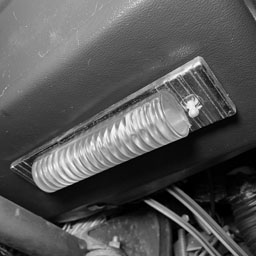
The under dash courtesy light in the CitiCar is not turning on when the switch is changed from one position to the next.
Open up
The cover was a bit difficult to remove. I slid it back and forth and tried squeezing the dome. Eventually I was able to remove it by putting pressure on the bottom side, pulling it up towards me, and lifting out.
Profile
Looking at the side of the plastic cover, it appeared that one of the tabs had a larger notch than the other.
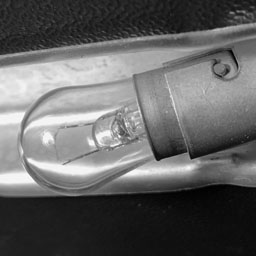
Twist
The bulb was fairly easy to remove. Push it into the socket, turn counter-clockwise, and pull out.
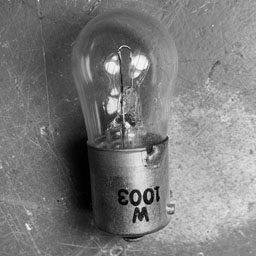
Part Number
The incandescent bulb had W1003 clearly printed on its base. Being so clear, I suspect it’s not the original bulb.
I’ve been having some trouble finding this part other than vintage old “new” stock. I saw some LED bulbs that mentioned 1003 as well as a few other replacements.
BA15S
P21W
54-EX
63
93
93LL
97
97A
97LL
97NA
199
631
631LL
1073
1073LL
1141
1141LL
1156
1156A
1156ALL
1156NA
1159
1195
1295
1295NA
2396
3014
3497
3497LL
7506
7506L
7506LL
7533
12088
Replacement bulbs for W1003
Test
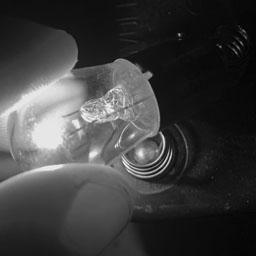
Just to be certain, I tested the bulb itself to verify if it had burnt out. I placed it on the contacts of a six volt lantern battery. It lit up just fine.
The heat that it produced from such a low voltage is encouraging me to find a different solution that does not transform as much energy into heat.
Accessory
I thought maybe it was on the circuit for accessories, and therefore wasn’t getting any power.
I flipped the ACC switch on the CitiCars’ dashboard, but the light was still unable to turn on.
Disconnected
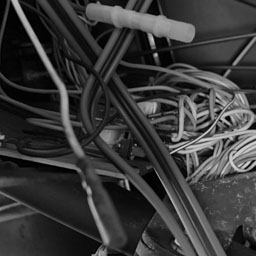
I started following wires. It was a mess, but I found that the accessory switch had a wire that wasn’t connected to anything.
I plugged two wires into each other, but there still wasn’t any power.
If it runs off of the main battery – this could be a problem.
Terminal Connection
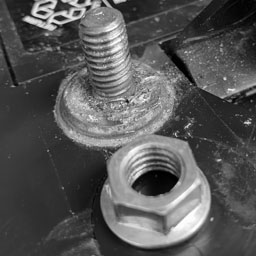
One of the cars batteries to the motor is currently disconnected. I have a nut that refuses to go back onto one of the terminals and seems to be biting into the threads. Other battery nuts look different, and go on the terminal just fine.
Wrong Parts
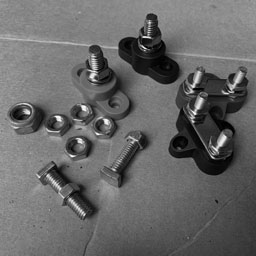
I didn’t know the size, so I purchased a few battery terminals that I thought I would need once I started installing a few lithium batteries in parallel. Everything was too small.
I also found an old bolt in the garage – and it was too big.
Group 31
I didn’t want to keep buying battery terminals blindly. I started looking up nuts for the batteries group size.
Sure enough, there was a specific type of nut for it. It seemed limited in where you could find them, and a bit pricey.
At this point, I’m testing various connections for continuity. I received a notice that the battery terminal was shipped out this afternoon.
I feel this is a bit absurd, but I figured out how to wire the 8-Track car radio into an Android head unit for the CitiCar. It’s “old vs new” where the two radios work together in epic proportions.
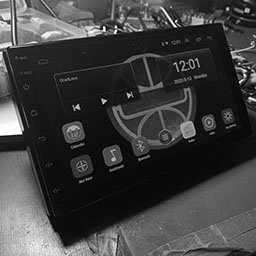
The Android Car Radio Head Unit
The 8-Track car radio can pickup both AM and FM, where the Android tablet is only compatible with FM stations. I like the older way of doing it instead of the digital radio app that they provide on the tablet.
Made in China
The Android tablet is strait out of China. Going under the hood, I was running into odd phrases and in some cases, a full screen of Chinese writing without an ounce of English.
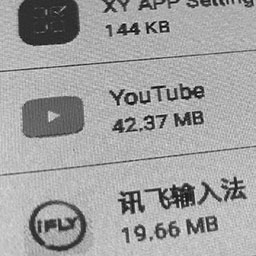
Chinese app iFLY
I had to uninstall apps such as one that had a logo of iFLY that kept changing my settings to use a Chinese keyboard at each boot-up. I still need to go over all apps to verify how much I trust them.
As a programmer, there were a few things of note that I did when digging around in the app. Here are a few of the default passwords I gathered, and things I did to get more access to the system.
Developer Mode
Android Settings About vehicular platform Click build number 9 times
Developer Options
OEM unlocking: On
Factory Settings
8888
Engineering test debugging
26959910
Bluetooth: Car BT
0000
Accessing the Android system for configuration
Wiring Harness
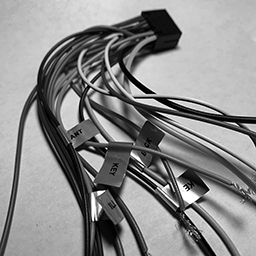
Not all wires are labeled on a radio harness
I learned quite a bit about wiring with most modern cars today. The CitiCar itself does not have a radio. It is often displayed as an option that you can have added onto the base models price.
Being inexperienced with wiring a car radio, I was confused when I saw a bunch of wires, where only some of them were labeled, and even then – the labels didn’t make much sense to me.
I couldn’t even power the device on when I hooked it up. I saw it draw power for about minute, followed by a trickle. I learned that the thin red wire is wired to the key so that the device powers on when you turn the key to the accessory position.
I found a ton of videos online describing the standard colors for radio speakers, illumination, amp, antenna, and battery power. I still had some trouble with other wires. Here is a list of information I have learned.
First, I’m assuming that it needs a 25 amp fuse for both the speakers and the device/GPS/camera. The four speakers outputs are rated for 45 watts each, for a total of 15 amps on a 12 volt system. The device itself has its own 10 amp fuse plugged into the back.
Wire
Label
Connection
Switch
Thick Yellow
POS
Battery Positive
25 Amp Fuse
Thick Black
NEG
Battery Negative
Thin Red
ACC
Battery Positive
Accessory Key
Orange
ILL DIM
Battery Positive
Headlights or Dimmer Switch
Pink
BACK
Battery Positive
Reverse Gear
Blue
ANT
Power Antenna
Blue +Stripe
AMP
Amplifier
White
Speaker Positive
Front Left
White +Stripe
Speaker Negative
Front Left
Gray
Speaker Positive
Front Right
Gray +Stripe
Speaker Negative
Front Right
Green
Speaker Positive
Rear Left
Green + Stripe
Speaker Negative
Rear Left
Purple
Speaker Positive
Rear Right
Purple +Stripe
Speaker Negative
Rear Right
Orange +Stripe
KEY
Battery Negative
Steering Wheel Control 0-5k Ohm
Brown +Stripe
KEY 2
Battery Negative
Steering Wheel Control 0-5k Ohm
Wires on a 12 volt car radio
Steering Wheel Controls
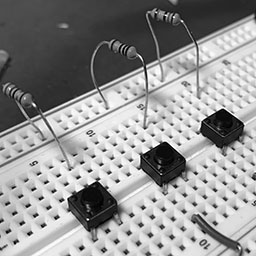
Breadboard of universal steering wheel controls (SWC)
I’m not quite sure if it was the most fun, but it was the most interesting experience I had trying to figure out how the key wires worked. These are for your universal steering wheel controls (SWC). I learned that it’s a very simple system that looks at a resistance value up to 5k Ohms between either “key” wire and the ground wire, which triggers the device to execute a command mapped to a specific resistance (or close to it).
After playing around with various resistors, I found the device was able to determine the difference between the following:
1
39
82
150
18
56
100
…
27
68
120
5,000
SWC Resistance Sensitivity
I gave up by time I got to 150 as it seemed as if it could tell the difference between all of the last few resistors. The lower differences in resistance are the hardest for it to determine. At minimum, it is advised to step at least 20 ohms between each of your control values.
I may look into making a 3D printed device sometime to control the device, or buy a generic wireless steering wheel add-on that can be strapped onto the CitiCar steering wheel.
Of special note is that the two key wires appear to have the same behavior. Putting the same resistor value on both wires, the system will react the same way. My understanding is that this second wire is to allow passengers in the vehicle have control over some of the radios functionality as well.
8-Track Audio to RCA
RCA Male Plug with Screw Terminal
I picked up an adapter with an RCA Male Plug on one end, and a screw terminal on the other. I was able to connect some wires from the 8-Track into the screw terminals. Then I simply plugged in the RCA jack into one of the RCA female plugs on the Android tablet to be available as an audio input device.
I’m still waiting for my remote control cable for a round Kodak projector 5 pin male plug to insert into the 8-Track radios plug. It will be easier to take the radio out of the car for maintenance in the future.
Pyle 2-Way 180 Watt Car Speaker
I purchased a pair speakers a few years back when I built a bar-top arcade. I went ahead and found the same speakers and purchased two sets for the CitiCar. I don’t know where I’ll put them just yet.
The last part of the equation was to hook up the speakers. The quality was much better than my test speaker. They are adequate for the car itself. The media tablet only puts out 45 watts to each speaker. 180 watts is more than enough to handle the power in such a small space.
Custom Logo
I customized the display to show the Sebring Vanguard logo from my CitiCars hubcap during boot-up. After much troubleshooting, I found that I needed to use a 1024×600 pixel bitmap using a color depth of 24 bits. I used the same image for my wallpaper as a PNG file.
PNG file for Sebring Vanguard wallpaper * Convert to 24-bit BMP format to use as a boot-up image
You can also set the boot animation. I’m often running into a wall trying to set it up. I’ve just recently got something working.
I’ve made a file that conforms to the bootanimation format. The latest thing that I did seems to have fixed the problem. I created a folder path to “/oem/media/bootanimation.zip”. I then went into the logo animation settings to select it. I’m a bit confused over it, but hey – progress. It may also be due to having the device in developer mode as well.
Version Notes
The device itself seems to be an unmarked/unbranded item. The plain brown cardboard box itself is marked as “Made in China” FCC CE and recyclable logos on opposite sides. It has no other details except a small label A2628KT on the top. Mucking about under the hood, I found a few things of interest, mostly regarding version numbers. The device itself thinks everything is up to date.
Android
9.1
XY Auto
3.1 (8227L)
CAN Pro
3.0 (8227L)
MCU
3.1 (8227L)
Model
8227L_demo
Security Patch
November 5, 2017
Kernel
3.18.22 gangll@zx-PowerEdge-R730 #5 Thu Oct 17 10:26:20 CST 2019
Build Number
android-trunk-m0.AC8227L-V1.0
Box Sticker
A2628KT
Version information behind
Video
I made a breakthrough this weekend setting up an 8-Track to play through an android head unit. Now I have Bluetooth, GPS, radio, backup camera, steering wheel controls, and more!
Product List
Double Din Car Radio GPS Navigation Android Head Unit 7″ HD Touch Screen Indash Car Stereo Support Dual USB, AUX in, Bluetooth, WiFi, FM, Mirror Link with Rear Camera (2G+32G)
讯飞输入法 (iFLY App)
8-TRACK AM Vintage car audio RADIO original
Joe Knows Electronics 1/4W 1% 86 Value 860 Piece Resistor Kit
MCIGICM 10pcs Breadboard 830 Point Solderless Prototype PCB Board Kit Protoboard MB-102 for Arduino DIY Electronics kit
WGCD 20 PCS Phono RCA Male Plug to AV Screw Terminal Plug Connector Audio Video Adapter
Remote Control Cable 5 Pin Male (Round/Kodak) Cutoff 5 Wires 22 Gauge 12 ft
Universal Car DVD GPS Player Wireless Remote Controller, Steering Wheel Remote Control Button for Car Navigation DVD / 2 din Radio Bluetooth Steering Control
Kalevel 120pcs Breadboards Jumper Wires Male to Female Jumper Wires Male to Male Jumper Wires Female to Female Jumper Wires Kit Long Ribbon Cable 20cm (m-m, f-f, m-f)
KAIWEETS 10PCS Electrical Alligator Clips with Wires Test Leads Sets Soldered and Stamping Jumper Wires for Circuit Connection/Experiment, 21 inches 5 Colors (10 PCS)
Peter Frampton Music
Update
I got “Car Settings” to do something. I’m beginning to think that KEY 1 and KEY 2 should be connected to the CAN bus. Here is how to make car settings show a screen for your specific car (If you had a Raise Electric Car JRYG-M2)
Car Settings \ Factory Settings [8888] \ Protocol Settings \ Raise \ Electric Car \ JRYG-M2 (can ID 1034001)










 The Chez